

AI BILLING AUDIT DESK
Lessen, Internal Billing Team + Vendors
PROJECT OVERVIEW
PROJECT
Internal Billing Audit Desk
SCOPE
Integrate AI capabilities into the vendor invoice submission process. This system automatically routes invoices that meet specific criteria for direct approval, while flagging those that need further review. A new audit desk for the billing team that efficiently approves, manages and resolves submitted/flagged invoices.
ROLE
Lead Product Designer
COLLABORATIONS
Project Manager, Product Owner, On and off-shore development team, various stakeholders, actual users
DATE
JULY 2024 - JANUARY 2025 (For initial launch)
PROBLEM
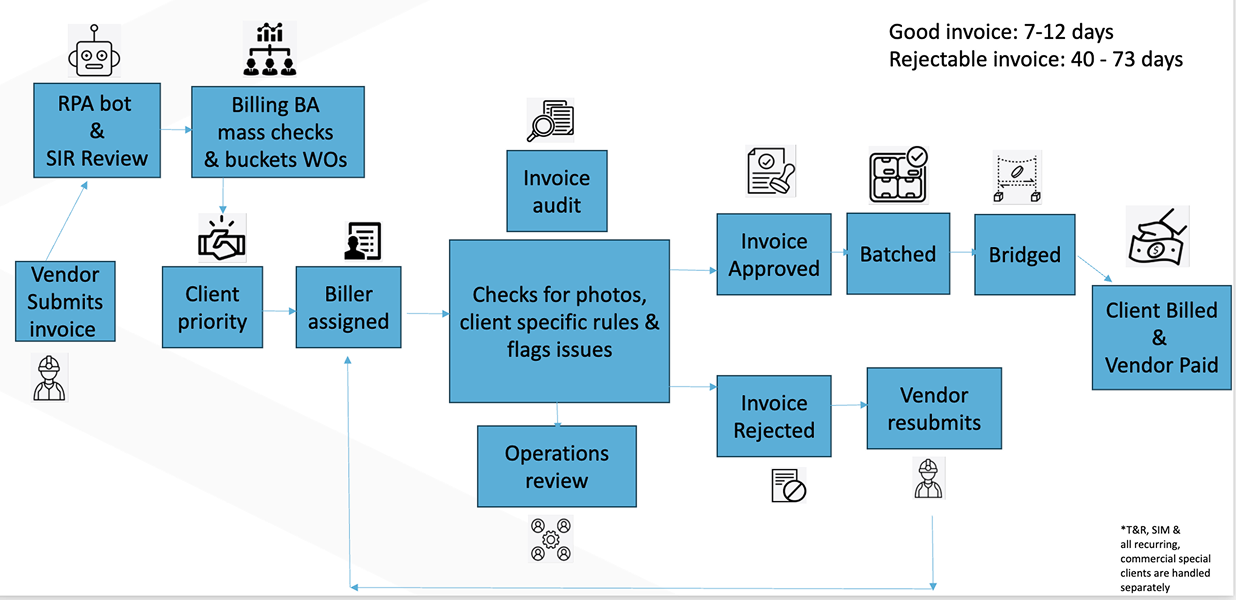
The internal billing team at Lessen was having billers manually review every invoice that was submitted by their vendors. This caused delay in invoices being processed and left room for error in the reviews. Because of this manual process, it would take a good invoice 7-12 days to process and a reject-able invoice 40 - 73 days. The vendors who submit the invoices also would submit without knowing if the invoice would be approved or rejected. When invoices were rejected, they would have to go back and forth with Lessen via phone or email to get the invoice fixed, resubmit and get it approved.
SOLUTION
Using AI, create a way for vendors to submit invoices that are more likely to be accepted by the Lessen billing team. Then make a system for the billing team to use to review all submitted invoices, keep them organized, and be able to accept/reject the invoice on the spot.
PROCESS
PHASE 1: CREATE AN AI TOOL SO USERS SUBMIT INVOICES THAT ARE LIKELY TO GET APPROVED
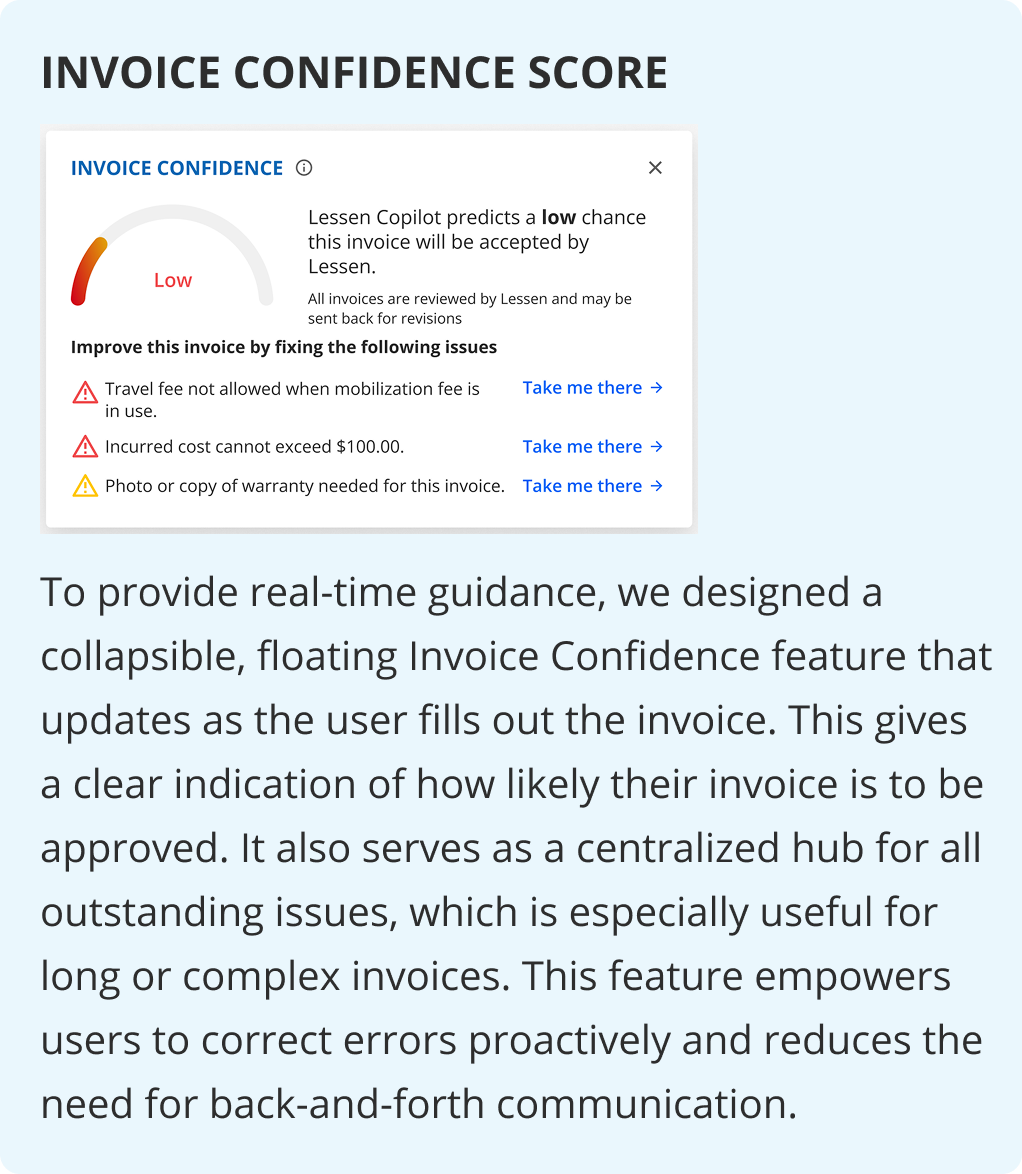
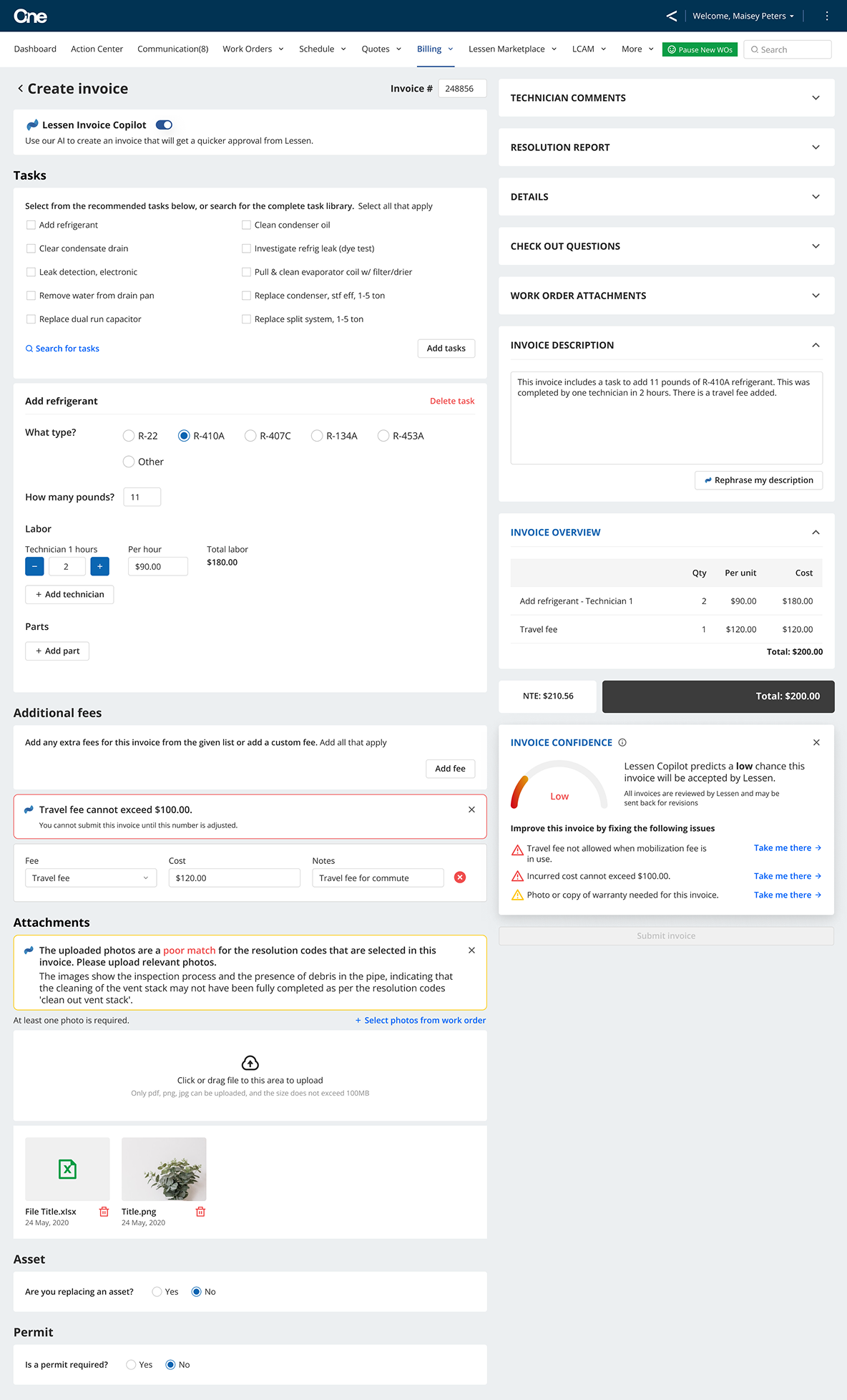
To boost invoice approval rates, we introduced intelligent AI guidance for vendors during invoice submission. This system analyzes their input as they type, offering real-time suggestions to ensure accuracy and minimize rejections, all while integrating seamlessly into existing processes.
These callouts on the invoice will be categorized as hard and soft stop rules and allow or not allow submission by the user.
PHASE 2: CREATE AN AUDIT DESK FOR THE BILLING TEAM TO REVIEW, TRACK, AND ACCEPT/REJECT INVOICES
Our billing team needed a centralized hub within our internal platform to manage all invoices. This new "audit desk" serves as the single destination where vendor-submitted invoices land after being pre-screened by the system against defined rules.
From this desk, users can efficiently review flagged items, then accept, reject, or reassign invoices for further review, ensuring streamlined processing and human oversight where it's needed most.
ACCESSING CURRENT PROCESSES
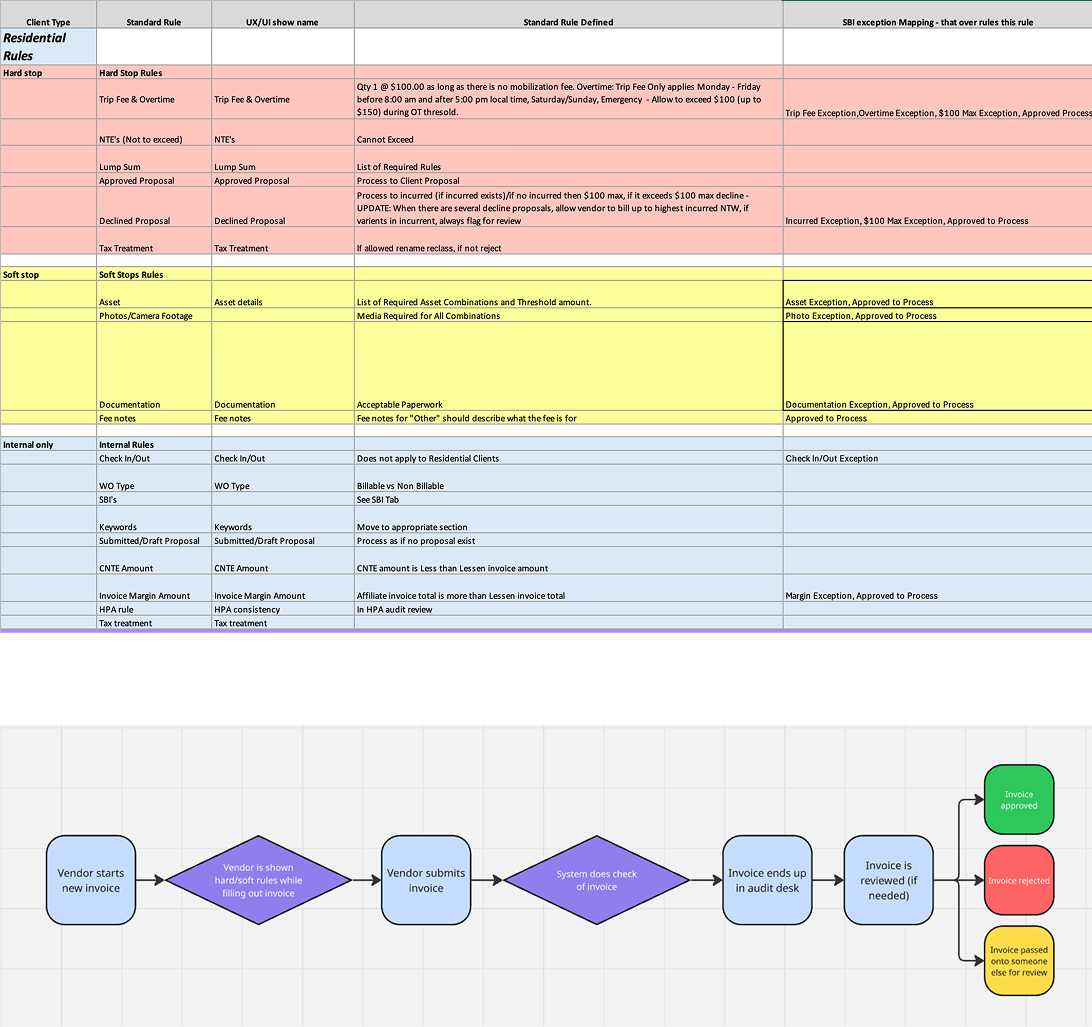
To make this product well, the project manager and I had to do a deep dive into the current process for reviewing invoices by the billing team. From there we were able to ideate with them on how what they currently had could translate onto the existing platform the internal team uses AND improvements to the process. Together, we were able to simplify the required rules for invoices as well as the overall process. We divided the rules into two types: hard stop rules which a user would not be able to submit an invoice with and soft stop rules that would be called out to the user, but wouldn’t prevent them from submitting the invoice.
I then took those rules and found a way to include them in the current invoice template we provide for our vendors. Because I had worked on invoice submissions with actual users in previous projects. I saved the user testing for that portion until I had lo-fi designs.
Next, I focused on the internal system where submitted invoices would be reviewed by our internal billing team. I created a workflow for the journey an invoice would go on once submitted. This included internal checks before showing up in the system and then a way for a billing team member to look at what had been called out in both the vendor check and internal check and a way for a billing team member to send the invoice for someone else to review.
I also had to make sure this would work seamlessly with the current system all work orders use for the process from work being requested by a tenant all the way through the vendor getting paid.
CREATING HARD STOP, SOFT STOP, AND INTERNAL RULES
This project involved a significant system overhaul for an internal team, which would fundamentally change their daily workflows. A key part of my role was to facilitate numerous working sessions with our three primary stakeholders to define the new rules for our AI-driven invoice submission and verification process. This effort was critical for the product's success and required securing buy-in from various teams across the organization.
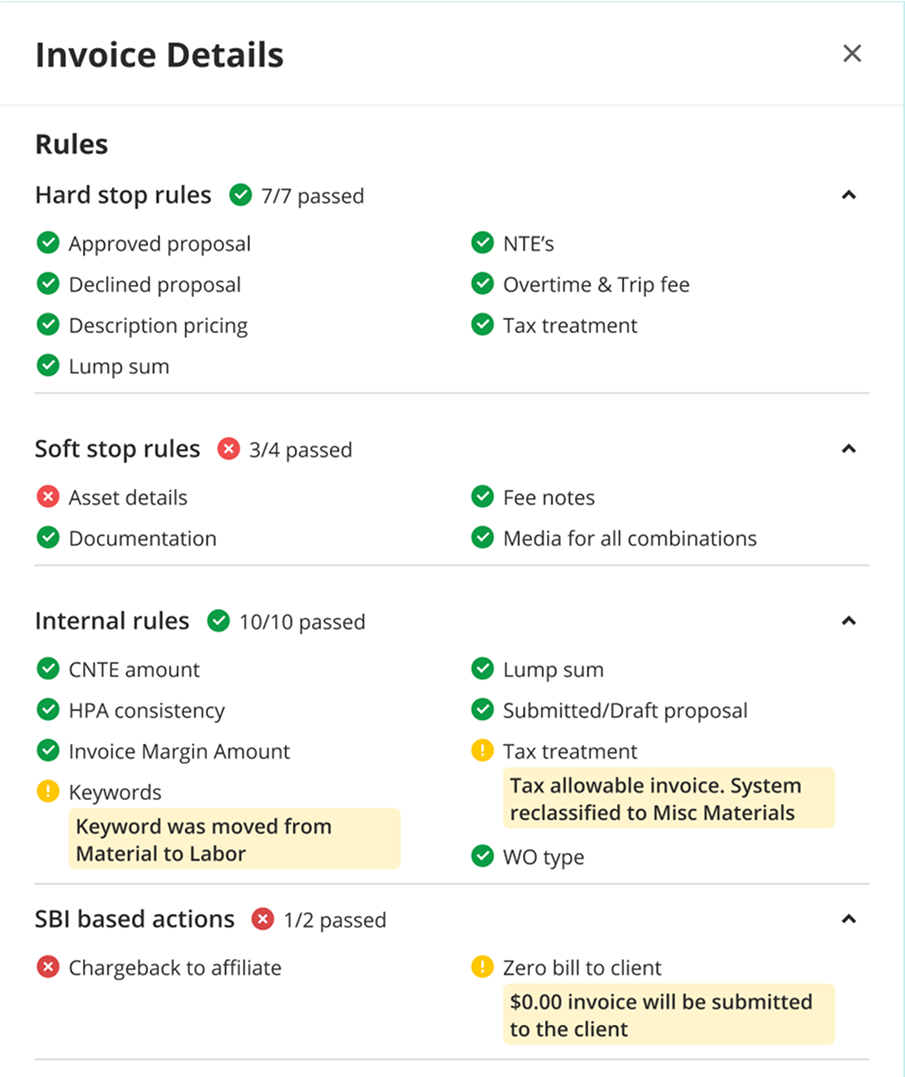
Later, an overview of these rules would all be displayed on the Invoice Audit Desk (shown to the right).
HARD STOP

These are rules that a vendor must follow to submit an invoice. If any of these rules are not met, the submission is blocked, and the vendor must correct the issue before proceeding. These rules prevent common errors, such as an overtime fee being too high or tax being improperly applied to the invoice.
SOFT STOP

These rules are designed to guide users toward best practices without blocking their workflow. The system provides immediate callouts when a rule is not followed, but vendors can still submit their invoice. This flexibility is crucial for situations where a rule might not apply to every invoice or for non-critical items. For example, the system might flag missing documentation or incorrect usage of a notes section, allowing the user to decide whether to correct the issue before submission.
INTERNAL
Once a vendor submits an invoice, the system applies a layer of internal rules that are only visible to our team. These rules are designed to handle business-specific logic that doesn't concern the vendor but is critical for accurate billing. They can be tailored to a specific client or vendor, ensuring their unique contractual requirements are met. This layer of automation streamlines the billing process and prevents manual errors from impacting the final invoice approval.
USABILITY TESTING
After conducting user tests, I gained valuable insights from both our vendors and internal staff.
I held 30-minute Zoom conversations with trusted vendors who have extensive experience with invoicing. These sessions provided great insight into their overall attitude toward using AI in the invoicing process. Based on their feedback, I removed a toggle at the top of the screen that was originally intended to turn AI features on and off, and I also learned which of the new AI features would likely be used the most.
They provided great feedback on the copy used for the hard and soft stop rules. I made sure that the callouts I designed were easily understandable so that users would know exactly how to fix an issue without any confusion. Since the new designs moved some original invoice features around on the screen, I also focused on making sure the new layout would be easy for users to adapt to.
I also continually ran small tests and asked for feedback from the internal staff who will be using the audit desk.
DESIGN SYSTEM
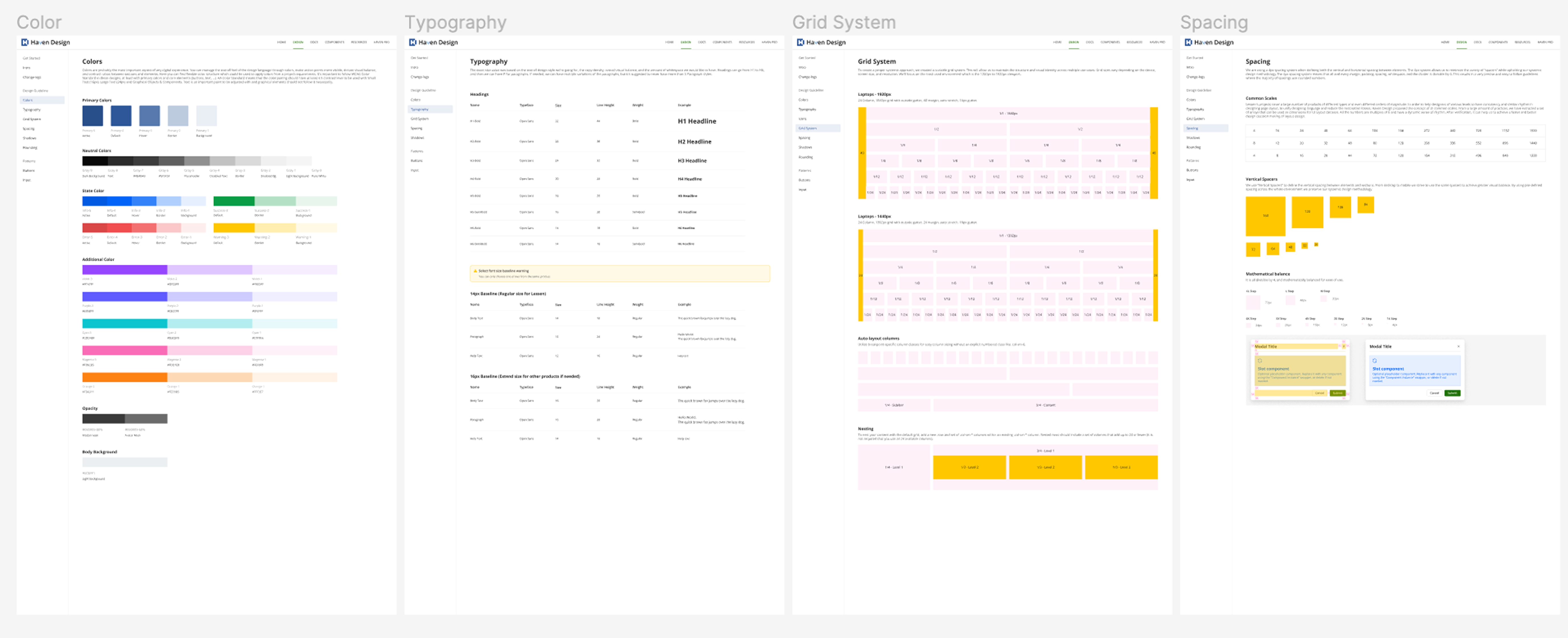
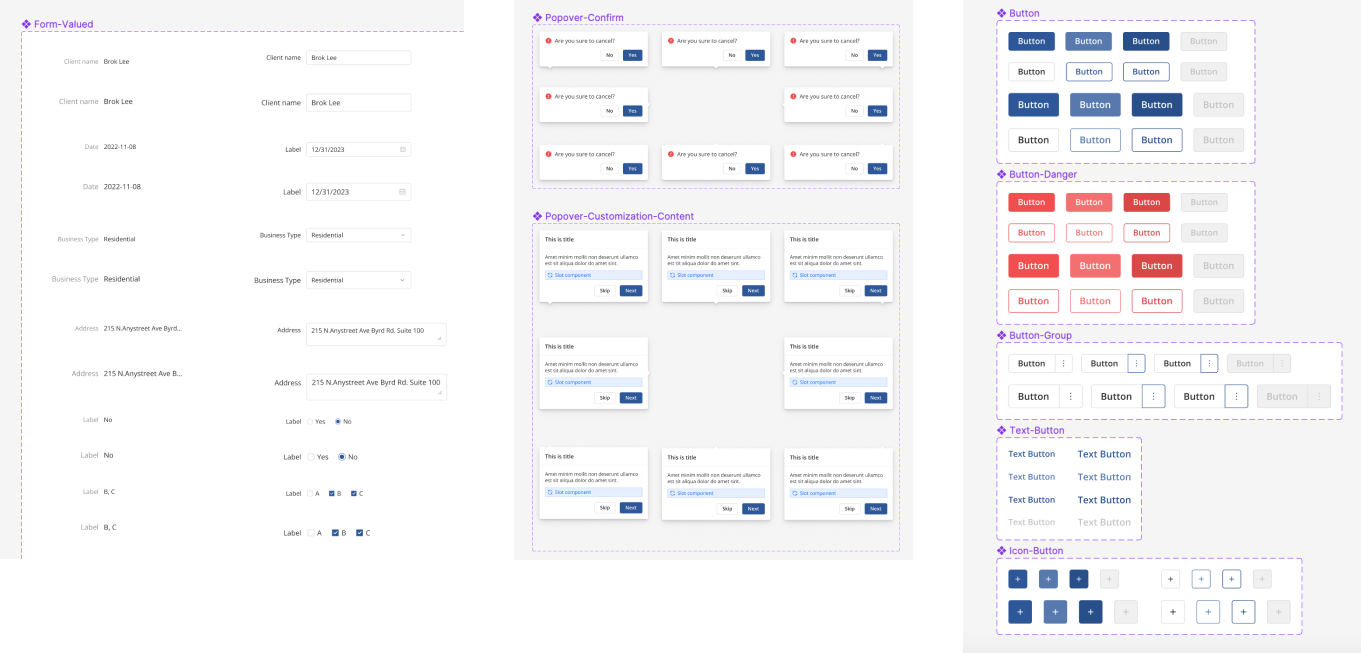
Some elements of this project already had existing designs that were using an old design system. I updated those features to our new design system as I went and any builds also used our new design system. See some of what the in-depth design system included below.
FINAL DESIGN
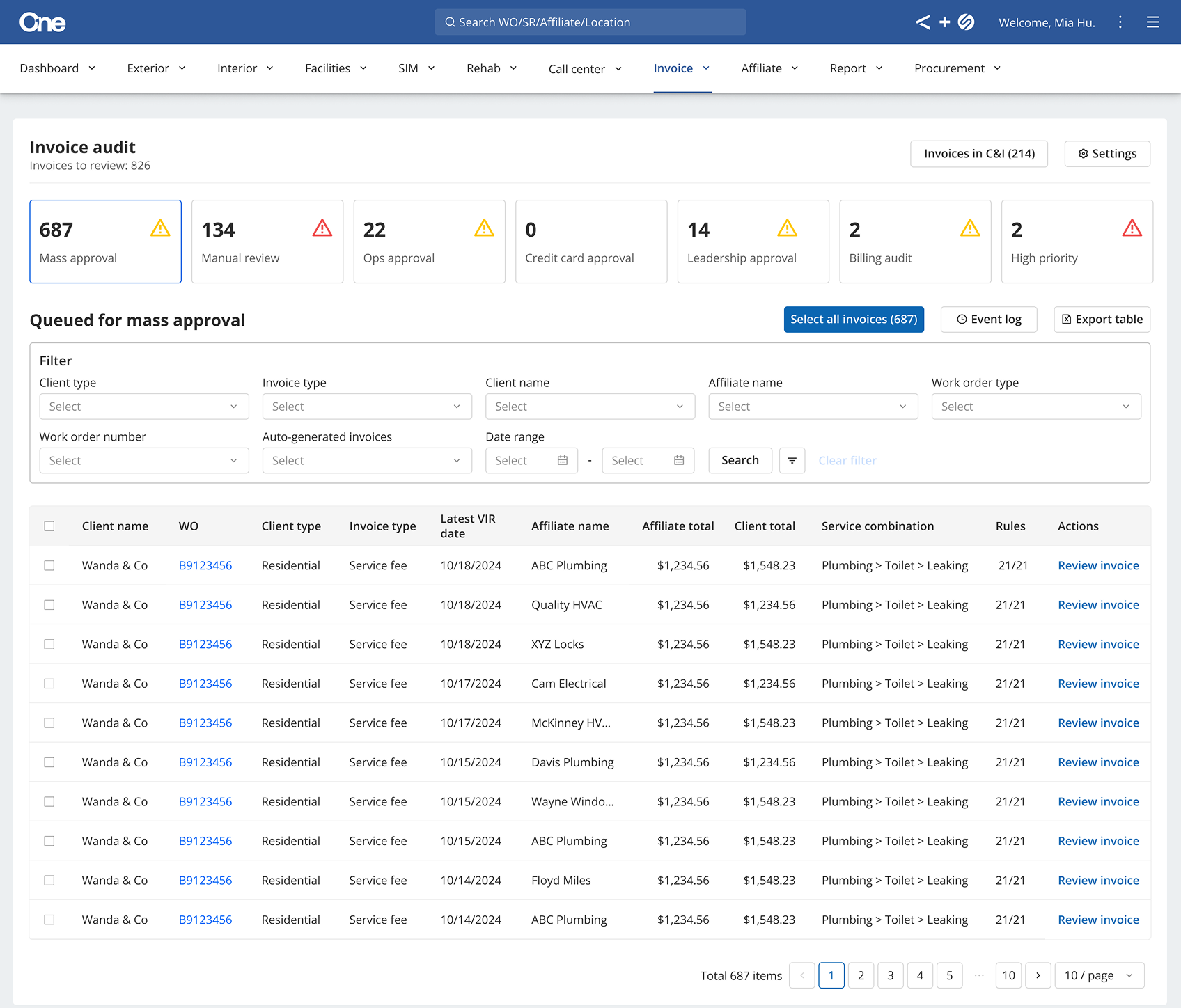
INVOICE AUDIT DESK
The process for all submitted invoices now reflects the journey above.
All submitted invoices now go through an internal review and land in one of the first two buckets on the main audit desk page. From there, audit desk users can review, approve, reject, or reassign an invoice to another bucket for further review.
A key improvement is the ability to mass approve a group of invoices with just a few clicks. This feature has drastically reduced processing times: a "good" invoice now takes only one day to process instead of seven, and a "bad" invoice takes three days instead of 43.
VENDOR INVOICE SUBMISSION
The implementation of new AI features and a guided invoicing process has led to a significant improvement in our system. Now, 89% of all invoices are automatically routed to the "Mass Approval" bucket, and the invoice rejection rate has dropped from 6% to just 1%.
These updates, combined with our Vendor Early Pay program, mean that vendors can submit a work order and get paid within the same week.
Both tools have created major efficiency gains for our internal team and our vendors. With less back-and-forth communication required, the billing team is now able to dedicate more time to other essential tasks, as the new rules check invoices for issues before a team member ever sees them.
WHAT I LEARNED
Sometimes you don’t need to re-invent the wheel entirely. Going into this I really wanted to do something different with the UX/UI than what our main competitor was doing. Once I tested out the wireframes, I quickly learned that some of what the competitor had was well thought out and made sense in the specific scenario I was designing for. My user testing confirmed that keeping a similar design was what the right experience to include.
This project was also a great experience for me to embrace the process of iterating. The “Needs work” section saw a lot of iterations through the design process and post launch, and I learned to go along with all the changes while pushing back when necessary.
